
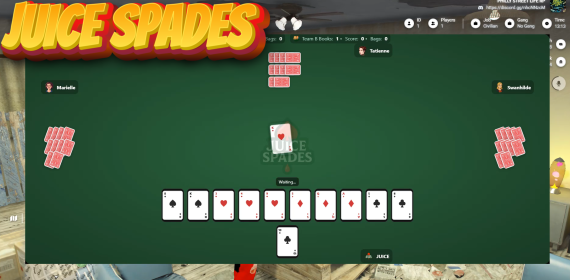
Juice Spades – Realistic Multiplayer Spades (ESX/QBCore)
Bring a polished, casino-table Spades experience to your server. Fully animated, wager-ready, and built for plug-and-play fun with friends or bots.
This now has Regular Spades, Joker Joker Duece Ace Spades, Rummy and Tonk built into it !!
Prop is included with purchase!!
Preview Video : https://www.youtube.com/watch?v=H_4oiX49d9s
Very easy to install!!
Highlights
🎴 Includes Card Deck Prop – Place, pick up, and move the table/deck in-world.
👥 Multiplayer Matches – 2v2 team play with bidding, books, bags, and scoring.
🤖 AI Players – Fill empty seats with smart bots so games always start.
👀 Spectate Mode – Let nearby players watch live hands and flow.
🔁 Dealer Rotation – Correct lead rotation each hand.
🔊 Audio Touches – Optional shuffle sound on deal + card lay SFX.
🔧 Configurable Rules – Win target, bag penalties, nil settings, timers, etc.
🔐 Wagers/Escrow Ready – (Optional) charge buy-ins and auto-payout winners.
🧭 Clean Lifecycle – Pick up prop to end a session; place it to start fresh.
🚀 More Updates to Come – Ongoing refinements and features planned.
Framework Support
✅ ESX compatible
✅ QBCore compatible
Works standalone for testing (bank hooks gracefully no-op).
What You Get
Server & client scripts for:
Lobby, ready-up, and wagers
Dealing, bidding, trick play, and correct spade rules (spades break, follow-suit logic)
AI decision-making for bidding and card play
Spectator UI flow
Clean match end + payouts + UI reset
Card deck/table prop
UI with scorebar, hand display, timers, turn badges, and animations
Requirements
OneSync (recommended for smooth multiplayer sync)
InteractSound (optional, for shuffle/lay SFX)
ESX or QBCore (for wager banking), or use standalone test mode
Commands / Quality of Life
/spades_ui_reset– Force-close UI as a safety reset (rarely needed)
Installation
Drop the resource into your server’s
resourcesfolder.Add to
server.cfg:ensure juice-spades(name as installed).Configure framework + rules in the config file.
(Optional) Add sound files to InteractSound (
shuffle.ogg,cardsound1.ogg, etc.).Start your server, place the deck prop, and press E to open the lobb